



Successfully Submitted
What Is App Development and How Do Apps Actually Work?
By Vaishnavi E
July 2, 2026 (Last Updated) | 5 mins read
Have you ever opened YouTube to watch your favorite video, or jumped into a Roblox game with your friends? Maybe you use an app to track your homework or listen to music on Spotify. But have you ever stopped and wondered, who made this? And how does it actually work?
That question is the beginning of something really exciting. Welcome to the world of app development! If you have ever searched for what is app development or how apps are built from scratch, you are in the right place. Let’s break it all down in the simplest way possible.
So, What Exactly Is an App?
An app (short for application) is a program you run on a device like your phone, tablet, or computer to do something specific.
Some apps help you learn. Some help you play. Some help you shop, chat, draw, or even build other things. Every single app you use was built by someone who once had zero idea how to code, just like you might right now.
There are two main types of apps you should know about:
Mobile Apps
Mobile apps are apps that you download and install directly on your phone or tablet. They work even when you are not connected to the internet, and they are built specifically for touchscreens.
Examples: Instagram, Minecraft, Google Maps, Snapchat
Web Apps
Web apps are apps that run inside a browser like Chrome or Safari. You do not need to download anything. You just open a link and they work instantly from any device.
Examples: Google Docs, YouTube, Canva, Gmail
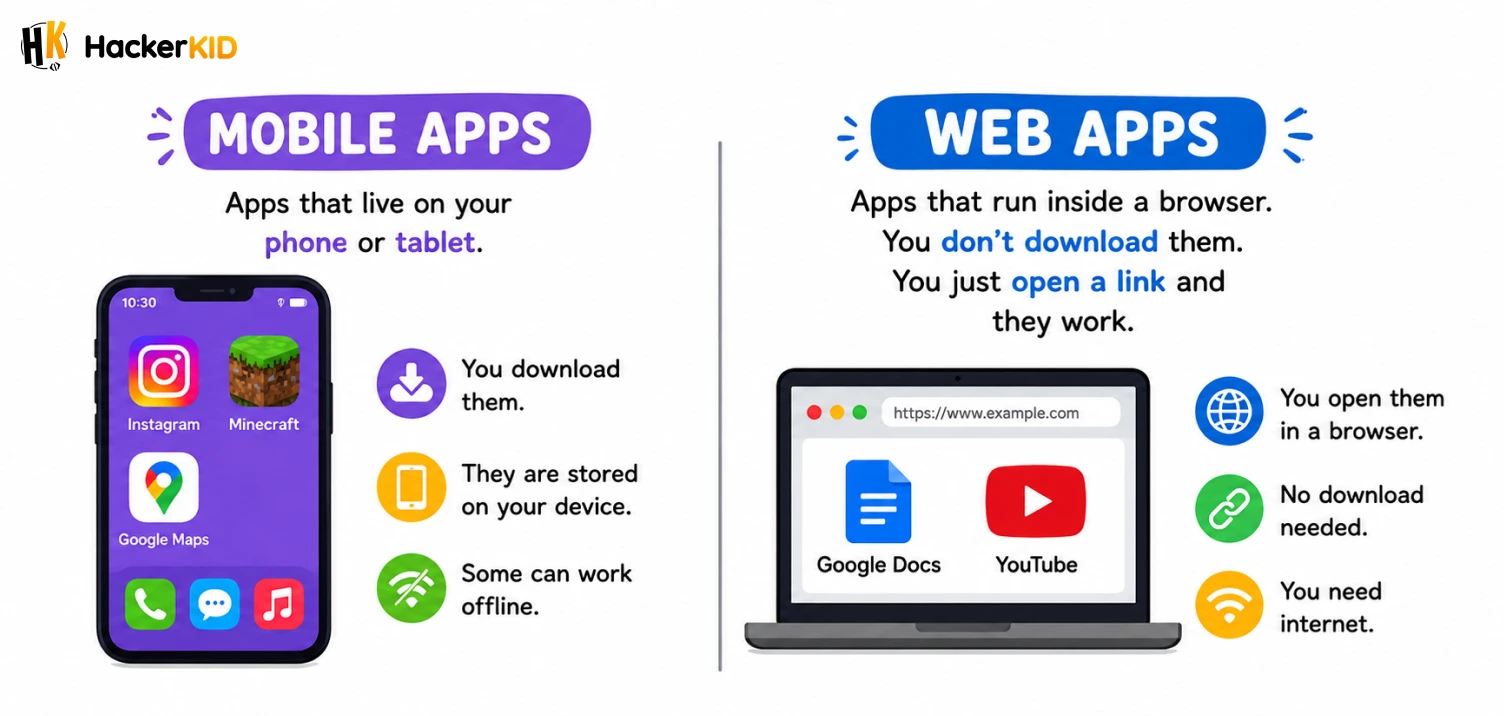
Both types are built through a process called app development, and that is exactly what we are going to break down in this blog.
The best way to understand app development is to build one yourself! Join our App Development course made just for kids and start building your own app!
What Is App Development?
If you are wondering what is app development in simple words, here is the answer. App development is the process of planning, designing, building, and testing an app before it reaches your hands. It is also called application development, and it is one of the most exciting and in-demand skills in the world right now.
Think of it like building a LEGO city. Before you place a single brick, you think about what kind of city you want, how many roads there are, where the buildings go, and what color everything is. App development works the same way. Developers think everything through first, then start building piece by piece.
There are usually three big stages in app development:
1. Planning the Idea
Every app starts with a simple question: What problem does this solve?
When the creators of Duolingo thought about their app, they asked, “How can we make learning a new language fun and easy for anyone?” That one question turned into one of the most popular learning apps in the world.
So before writing a single line of code, developers figure out:
- Who will use the app?
- What will the app do?
- How will people move around inside it?
2. Designing the Look
Once the idea is clear, designers step in to decide how the app will look and feel.
This is called the UI (User Interface), which is basically everything you see on the screen. The buttons, colors, fonts, and icons are all carefully designed so the app is easy and fun to use.
There is also something called UX (User Experience), which is about how smooth and simple the app feels when you use it. Have you ever used an app where you could not figure out where to tap next? That is a UX problem. Good developers always make sure the app is smooth and easy to navigate, so users never feel lost or confused.
3. Building and Coding
This is where the real magic happens. Developers write code, which is a set of instructions that tells the app exactly what to do.
When you tap the “Play” button on Spotify, code runs in the background to find your song, load it, and play it through your speaker. When you open Snapchat and the camera turns on instantly, that is code doing its job.
Different apps use different programming languages, which are just different ways of writing those instructions. Some popular ones include:
- Python is great for beginners and used in tons of apps
- JavaScript is widely used for web apps
- Swift is used to build iPhone apps
- Kotlin is used to build Android apps
How Apps Work: The Simple Version
Here is the part most people never think about. Understanding how apps work is just as important as knowing how apps are built. So what actually happens inside the app when you use it?
Let’s use a simple example: ordering food on Zomato or Swiggy.
Step 1: You open the app.
The app loads on your phone. All the images, menus, and restaurant names appear on your screen. This part of the app, the stuff you see, is called the frontend.
Step 2: You search for pizza.
You type “pizza” and hit search. The app sends your search to a server. Think of a server like a super powerful computer sitting somewhere far away, storing all the data for the app.
Step 3: The server finds your answer.
The server looks through thousands of restaurants, finds all the pizza places near you, and sends that information back to your phone. This back and forth between your phone and the server is called the backend.
Step 4: You see the results.
Your phone receives the information and shows you a list of pizza restaurants. You pick one, place your order, and wait for the doorbell!
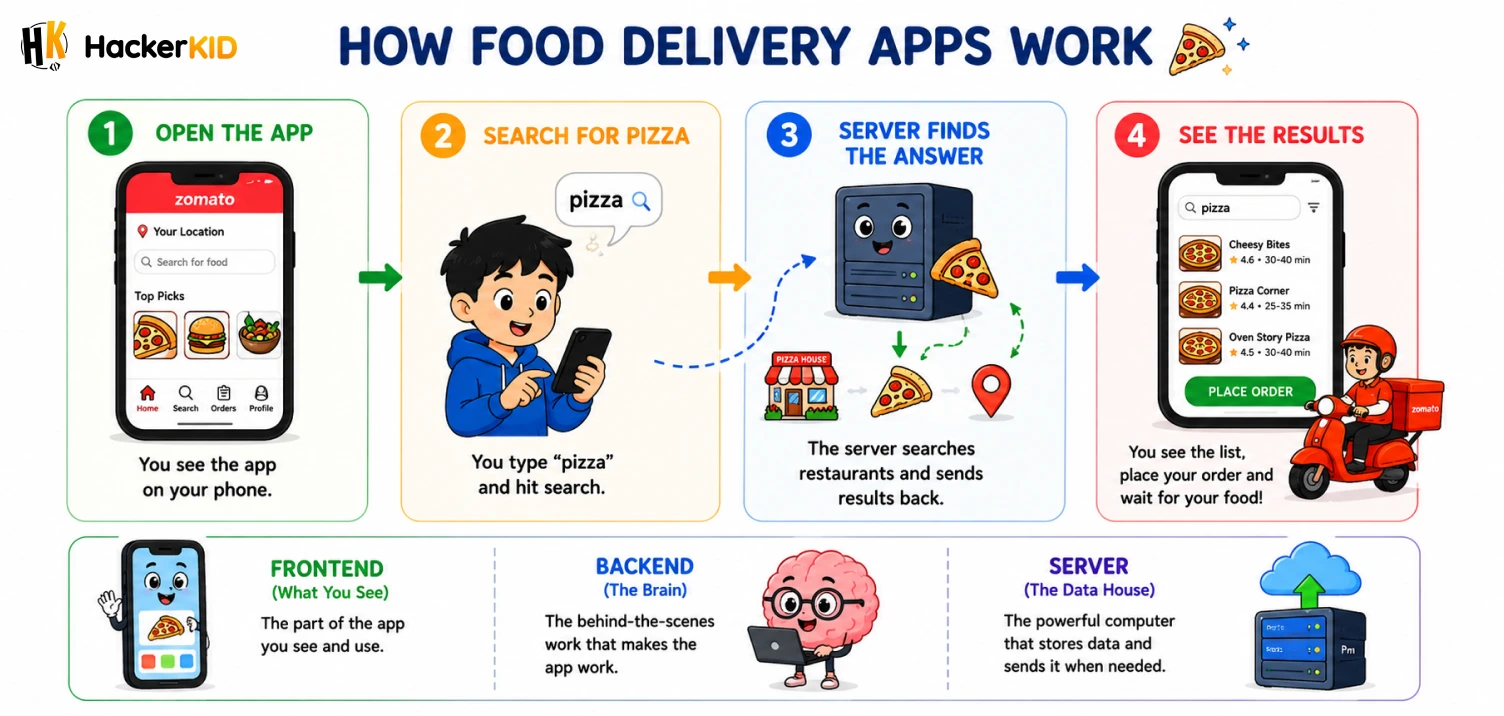
So every time you use an app, there is a frontend (what you see), a backend (the brain working behind the scenes), and a server (where all the data is stored and managed). That is exactly how apps work in real life, every single time you tap your screen.
Pretty cool, right?
What Tools Do Developers Use?
Knowing how apps are built also means knowing the tools developers use every day. You do not build an app with your hands. You use special tools on a computer. Here are a few:
Code Editors like VS Code are where developers actually type their code. Think of it like a super smart notebook that understands programming languages.
Frameworks are ready-made sets of tools that make building faster and easier, so developers do not have to build everything from scratch. For example, React Native lets developers build one app that works on both iPhones and Android phones.
Testing Tools are used before an app reaches you. Developers test it hundreds of times to catch bugs. A bug is when something in the code goes wrong and the app does not behave the way it should.
Who Actually Builds Apps?
You might think only super genius adults build apps, but that is not true at all!
There are kids your age who have built real apps that people actually use. In fact, some of the most creative app ideas come from young people, because they notice problems in everyday life that adults often overlook.
Here are the main people involved in application development:
- Frontend Developers build everything you see and interact with
- Backend Developers build the hidden systems and logic that power the app
- UI/UX Designers make sure the app looks great and feels easy to use
- Testers (QA Engineers) find bugs before the app goes public
- Product Managers oversee the whole project and keep everyone on track
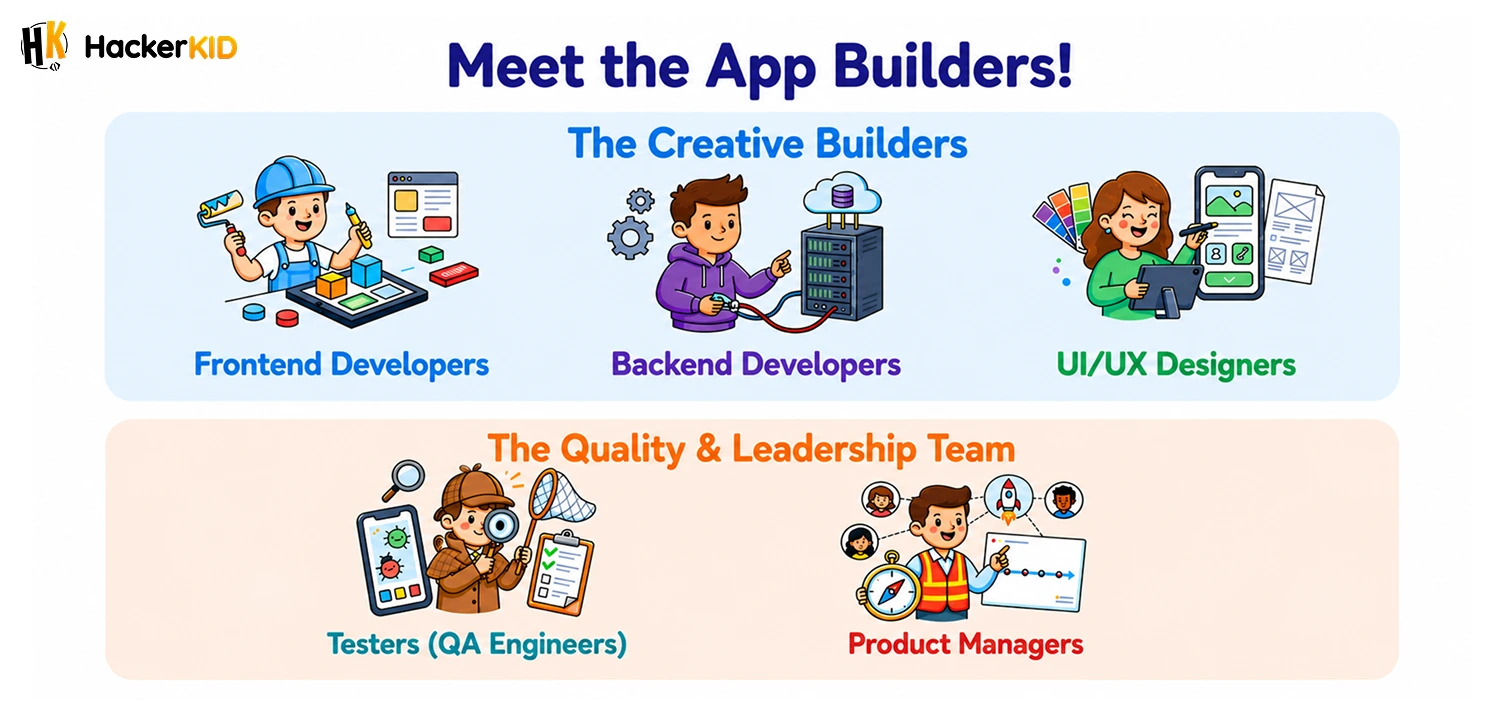
In big companies like Google or Meta, hundreds of people work together on one app. But if you are building something small and fun, one person can do it all, including you!
App Development for Beginners: Where Do You Start?
This is the section you have been waiting for. App development for beginners is much more approachable than most people think. You do not need to be in college or work at a tech company to start. All you need is curiosity, a device, and the willingness to learn.
Here is a simple roadmap to get started:
- Pick a programming language. Python or JavaScript are great starting points for beginners.
- Learn the basics. Understand how variables, loops, and functions work.
- Start small. Build something tiny, like a quiz app or a simple calculator.
- Keep experimenting. The more you build, the better you get.
Every developer started exactly where you are right now, not knowing anything. The only difference between them and everyone else is that they started.
Why App Development Is an Amazing Skill to Learn
We live in a world where apps are everywhere. From healthcare to gaming to education, every industry now depends on app development to work better and reach more people.
Learning app development does not just teach you how to code. It teaches you how to think like a problem solver. You start looking at the world differently. Instead of just using apps, you start thinking, “What if I built something like this? What if I made it better?”
That kind of thinking is how the next generation of developers, entrepreneurs, and innovators are born.
Explore our App Development course made just for kids like you and start coding from scratch, no experience needed!
Let’s Wrap It Up
Here is a quick recap of everything you learned:
- An app is a program that runs on your phone, tablet, or computer to help you do something
- App development (also called application development) is the full process of planning, designing, building, and testing an app
- Understanding how apps work comes down to three things: a frontend, a backend, and a server
- Knowing how apps are built helps you appreciate every tap, swipe, and screen you interact with
- App development for beginners is very real, and you can absolutely start today
The apps you use every single day were once just ideas in someone’s head. App development made them real. Your idea could be next. So what are you waiting for? Let’s start building!
FAQs
💬 Quick Answers 1. How do apps actually work?
Every app works through three main parts:
Frontend – everything you see on the screen, like buttons and menus
Backend – the hidden brain that processes everything you do
Server – the place where all the app’s data is stored
When you tap something, your phone talks to the server, gets the answer, and shows it on your screen instantly.
2. Is app development easy?
Here is the honest answer:
It is not super hard
It does get easier the more you practice
Starting small makes it much less overwhelming
Think of it like learning a new sport. The first few tries feel awkward, but with practice, it becomes natural and even fun.
3. Which language is best for app development?
It depends on what you want to build:
Just starting out – Python
iPhone apps – Swift
Android apps – Kotlin
Web apps – JavaScript
Start with Python if you have no idea where to begin. It is the most beginner-friendly option out there.
4. How is an app built?
Every app is built in 4 simple steps:
Plan – decide what the app will do and who will use it
Design – create the look, colors, buttons, and layout
Code – write the instructions that make everything work
Test – find and fix bugs before the app goes live
Every app on your phone went through these exact four steps.
5. Can I create my own app?
Yes, 100%! Here is what you need to get started:
A device (laptop or computer)
A beginner-friendly language like Python or JavaScript
A small idea to build, like a quiz or a calculator
Patience to learn and try things out
You do not need a degree. You just need the decision to start.
6. What is frontend and backend?
Think of an app like a restaurant:
Frontend = the dining area (what customers see and interact with)
Backend = the kitchen (where everything is prepared behind the scenes)
Both work together to give you a smooth experience. No kitchen means no food, and no dining area means no customers.
7. How do I start app development?
Follow these simple steps:
Step 1: Pick a language, Python or JavaScript is perfect for beginners
Step 2: Learn the basics, like variables, loops, and functions
Step 3: Build something small, like a quiz app or a to-do list
Step 4: Keep building, keep improving, and never stop experimenting
The best time to start is today, not tomorrow.
Table of Contents
So, What Exactly Is an App?
What Is App Development?
How Apps Work: The Simple Version
What Tools Do Developers Use?
Who Actually Builds Apps?
App Development for Beginners: Where Do You Start?
Why App Development Is an Amazing Skill to Learn
Let's Wrap It Up
FAQs


Related Posts
10 Easy Robotics Projects for Kids to Try (Beginner Level)
You might feel building a robot is hard, but it is easier than you think. With just a few basic …
July 2, 2026 | 8 mins read
Read More
What Are Robot Sensors and How Do Robots Use Sensors to Interact With the World?
Close your eyes for a second. Now try to walk across your room. Hard, right? You might bump into a chair …
July 2, 2026 | 7 mins read
Read More
What Is Raspberry Pi for Kids and How Can Kids Use It to Build Robotics Projects?
Technology gives children exciting ways to create, experiment, and solve problems. Raspberry Pi for kids makes this possible by combining …
July 2, 2026 | 8 mins read
Read More