



Successfully Submitted
What Is the Difference Between a Web App and a Mobile App?
By Vaishnavi E
July 4, 2026 (Last Updated) | 6 mins read
Have you ever opened YouTube on your laptop browser and also on your phone? Did you notice they look a little different? That is not a mistake. That is actually because one is a web app and the other is a mobile app. Understanding the difference between web app vs mobile app is something every young coder should know. And yes, there is a real difference between the two!
Let us break it all down in the simplest way possible.
First Things First! What Even Is an App?
Before we get into the difference, let us quickly understand what an app is.
An app (short for application) is basically a program that helps you do something on a device. It could help you watch videos, play games, chat with friends, or even learn to code. Apps are everywhere, on your phone, your laptop, your tablet, and even your smartwatch!
Now, not all apps are the same. Some live on the internet, and some live right on your device. That is where web apps and mobile apps come in.
What Is a Web App?
A web app is an app that you use through a web browser. A browser is a program like Google Chrome, Mozilla Firefox, or Safari. You do not need to download or install a web app. You just open your browser, type in a website address, and boom, you are using it!
Real-life example: When you open Google Docs in your browser to write something, that is a web app. You did not install anything, right? You just went to docs.google.com and started typing. That is a web app doing its thing!
Here are some common web app examples you probably already use:
- Google Classroom (where your teachers share assignments)
- Canva (for making cool designs)
- Gmail (for sending emails)
- Roblox’s website (yes, you can play some games right in the browser!)
Web apps work as long as you have a good internet connection and a browser. They are not stored on your device. Think of them like a restaurant. The food (the app) is not in your house. You go to the restaurant (the browser) to get it.
What Is a Mobile App?
A mobile app is an app that you download and install on your phone or tablet. You usually get them from the Google Play Store (for Android phones) or the App Store (for iPhones). Once you install them, they live on your device.
Real-life example: When you download Minecraft on your phone and play it even without Wi-Fi, that is a mobile app. It is saved right on your phone and does not always need the internet to work!
Other examples of mobile apps:
- YouTube Kids (from cartoons to cool experiments, there is something for everyone!)
- Roblox (play thousands of games created by other players!)
- Instagram (scroll, post, like, all from your phone)
- Spotify (listen to music on the go)
Mobile apps are built specially for phones and tablets. They use your phone’s features like the camera, GPS, microphone, and even the accelerometer (that is the thing that knows when you tilt your phone!).
Also Read:The Beginner’s Guide to Understanding How Mobile Apps Are Made
Think you have the next big app idea? Enroll in our App Development Course made just for kids like you and make your idea a success!
Web App vs Mobile App: The Key Differences
Okay, now that we know what both of them are, let us look at the difference between web app and mobile app more clearly. Here is a simple comparison:
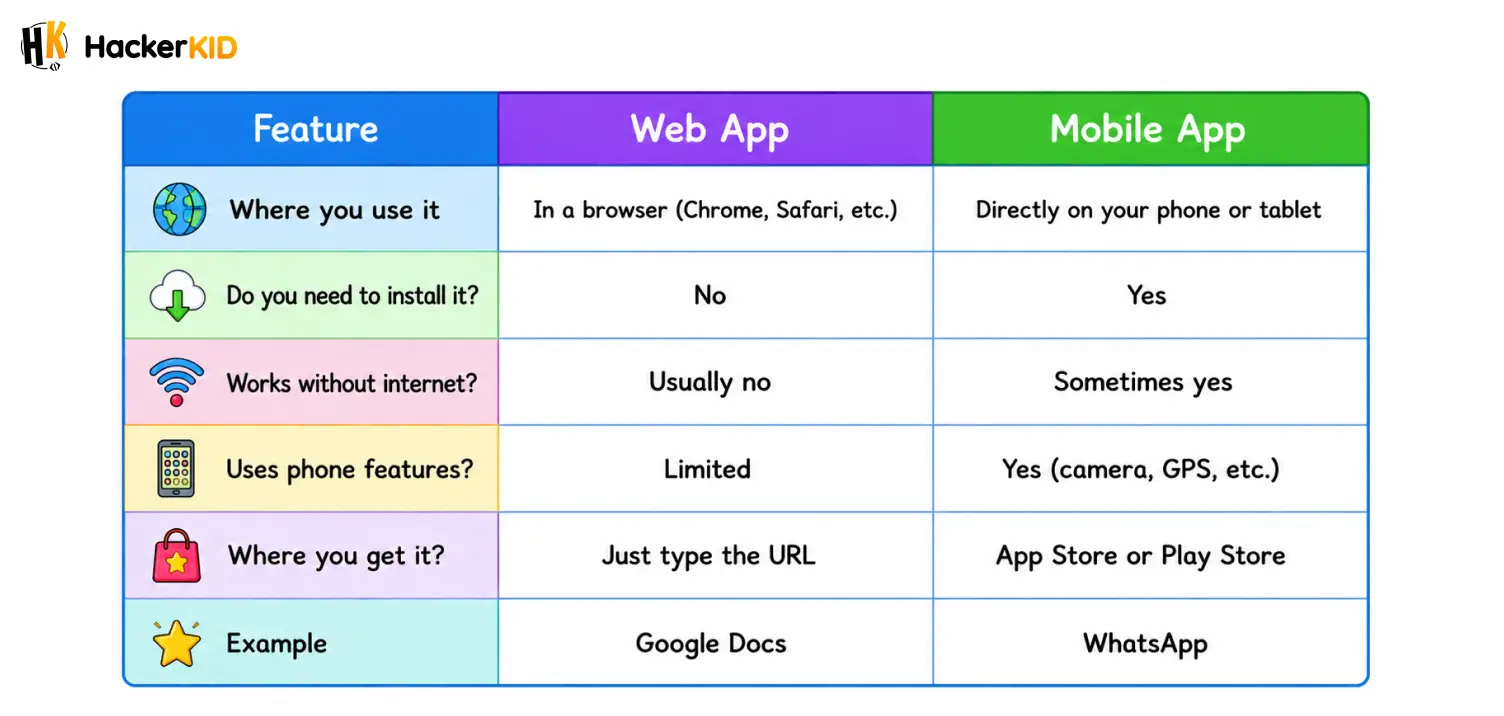
A Fun Way to Remember the Difference
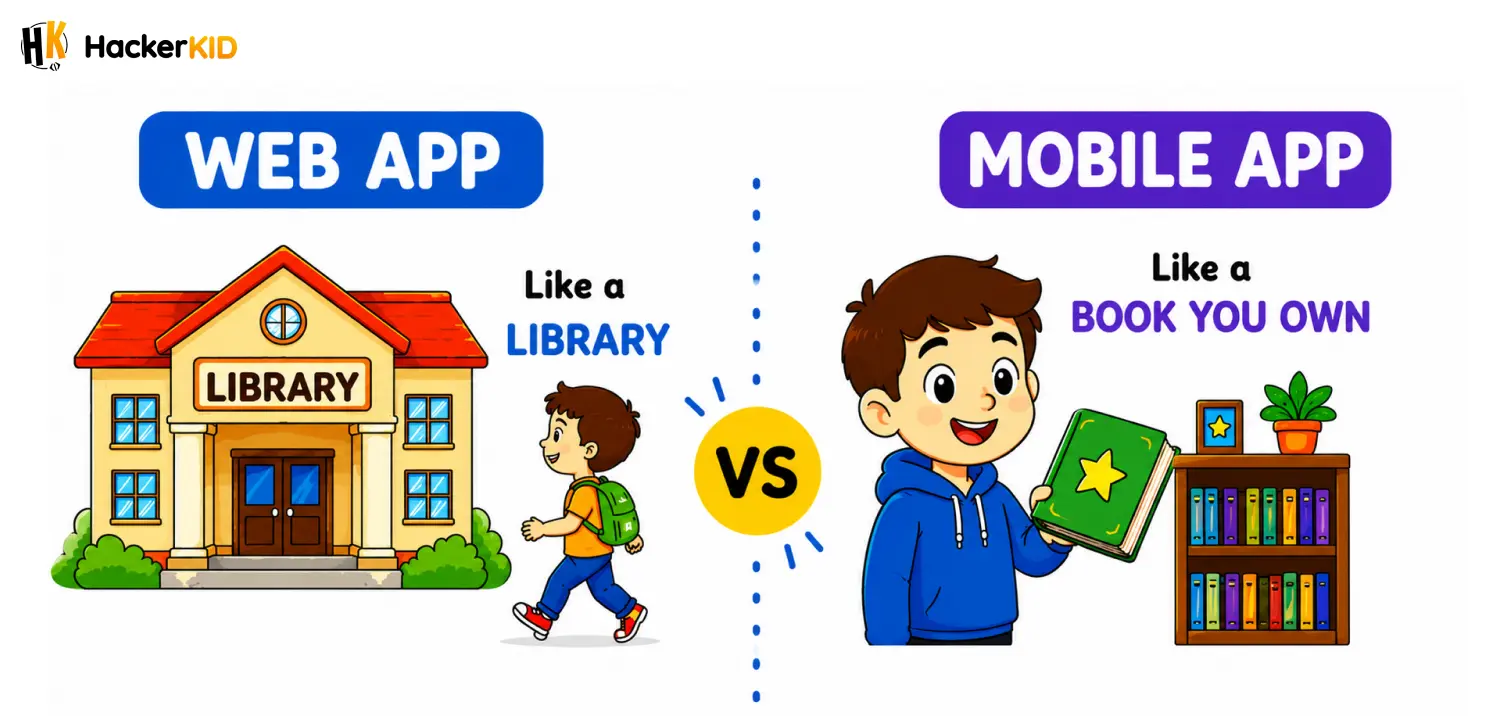
Think of it like this:
A web app is like a library. You go there to use the books. You do not take the library home with you. You need to travel there (use a browser) to access everything.
A mobile app is like a book you own. It is right there on your shelf (your phone). You can open it anytime, even without going to the library, without the internet in some cases.
Can Something Be Both?
Great question! Yes, some apps actually exist as both a web application and a mobile application. Take YouTube, for example.
- When you open youtube.com on your laptop browser, you are using the web application.
- When you open the YouTube app on your phone, you are using the mobile application.
They look slightly different and work a little differently too. The mobile app lets you download videos to watch later. The web app does not always let you do that. That is one example of how the web application vs mobile application experience can feel very different, even for the same platform.
Same with Spotify! On the browser, you can listen to music. But on the mobile app, you can download songs, control it from your lock screen, and do much more.
Also Read: What Is App Development and How Do Apps Actually Work?
Which One Is Better?
Neither one is “better.” They just serve different purposes!
When you think about web app vs mobile app, it really comes down to what you are trying to do and where you are doing it. Web apps are great when you are sitting at a computer and need to get work done quickly without downloading anything. Mobile apps are awesome when you are on the move and want a smoother, faster experience on your phone.
Think about it this way:
- If you want to type up a school project quickly, you might open Google Docs in your browser (web app).
- If you want to share a photo with your friends, you open Instagram on your phone (mobile app).
Both have their own superpower!
So, Who Makes These Apps?
This is where it gets exciting for you as a young learner!
Developers (people who write code) build both web apps and mobile apps. But they use different tools and coding languages to do it.
- Web apps are often built using languages like HTML, CSS, and JavaScript.
- Mobile apps for Android are often built using Java or Kotlin.
- Mobile apps for iPhones are often built using Swift.
- Some developers also use tools like Flutter or React Native to build one app that works on both Android and iPhone at the same time.
If you have started learning to code, you are already taking the first step toward building your very own app one day, whether it is a web app or a mobile app!
Why just use apps when you can build one? Discover our App Development course for kids and start learning from scratch!
Quick Recap
Let us do a super fast recap before we go:
- A web app runs in a browser. No installation needed. Common web app examples include Google Docs and Canva.
- A mobile app is downloaded and installed on your phone. Examples include Minecraft and WhatsApp.
- The difference between web app and mobile app comes down to where it runs, how you access it, and what it can do.
- Some apps like YouTube and Spotify exist as both a web application and a mobile application.
- Developers use different coding languages to build each type.
The next time you open an app, pause for a second and think about web app vs mobile app. Ask yourself, “Am I using this in a browser or on my phone?” Now you will know exactly what kind of app it is. And that is a pretty cool thing to know!
Happy exploring!
FAQs
💬 Quick Answers 1. What is the difference between a web application and a mobile application?
A web application runs in a browser like Chrome or Safari. No installation needed.
A mobile application is downloaded and installed on your phone from the App Store or Play Store. Think of apps like Instagram, Minecraft, or Spotify that you download on your phone.
2. Can I use a web app without the internet?
Usually no. Web apps need an active internet connection to work because they run through a browser. Mobile apps, on the other hand, can sometimes work offline once they are installed on your device.
3. Is a website the same as a web app?
Not exactly. A website mostly shows you information, like a news page or a blog. A web app lets you interact and do things, like play a game on Roblox or watch and search for videos on YouTube.
4. Which is better, a mobile app or a web app?
It depends on what you need! Here is a quick guide:
Choose a web app when you are on a laptop and want something quick without downloading.
Choose a mobile app when you are on the go and want a smoother phone experience.
When it comes to web app vs mobile app, neither is better. They just serve different purposes!
5. Is WhatsApp a web application?
WhatsApp is mainly a mobile app. But it is available in three ways:
The mobile app is downloaded on your phone and works on its own.
WhatsApp Web opens in your browser on a laptop or computer.
The WhatsApp Desktop app can be downloaded and installed on your laptop or computer too.
Both WhatsApp Web and the Desktop app need your phone to be connected and active to work!
6. Is Facebook a web app or mobile app?
Facebook is both!
Open facebook.com in your browser? That is the web app.
Use the Facebook app on your phone? That is the mobile app.
Both let you post, message, and scroll. But the mobile app gives a much smoother experience on your phone and works better even with a slow internet connection!
7. Is a web app easier than a mobile app?
Yes! Here is why:
Web apps are built with HTML, CSS, and JavaScript, which are beginner-friendly languages.
Mobile apps need Swift (for iPhone) or Kotlin (for Android), which are more advanced.
Most young coders start with web apps before moving on to mobile app development!
Table of Contents
First Things First! What Even Is an App?
What Is a Web App?
What Is a Mobile App?
Web App vs Mobile App: The Key Differences
A Fun Way to Remember the Difference
Can Something Be Both?
Which One Is Better?
So, Who Makes These Apps?
Quick Recap
FAQs


Related Posts
Android vs iOS App Development: What Young App Developers Should Know
Have you ever noticed that some of your friends have an iPhone and others have an Android phone, but the …
July 4, 2026 | 7 mins read
Read More
What Is UI and UX Design and Why Do Apps Need Both?
Have you ever opened an app and thought, "Wow, this looks so cool!" or "This is so easy to use!" …
July 4, 2026 | 6 mins read
Read More

The Beginner's Guide to Understanding How Mobile Apps Are Made
Have you ever opened Instagram to check your friend's post, played a round of Subway Surfers while waiting for lunch, …
July 4, 2026 | 6 mins read
Read More