



Successfully Submitted
What Is Raspberry Pi for Kids and How Can Kids Use It to Build Robotics Projects?
By Vaishnavi E
August 26, 2026 (Last Updated) | 8 mins read
Technology gives children exciting ways to create, experiment, and solve problems. Raspberry Pi for kids makes this possible by combining programming, electronics, and hands-on robotics projects.
In this guide, let’s explore what Raspberry Pi is, understand how the board is used in robotics, and look at some simple projects children can build with it.
What Is Raspberry Pi?
Raspberry Pi is a small, programmable board that can act as the brain of a robot. It receives information from sensors, processes that information, and sends instructions to different parts of the robot, such as motors, LEDs, and other electronic components.
For example, imagine a robot moving forward and an object appears in its path. A sensor detects the object and sends the information to the Raspberry Pi board. The Raspberry Pi then processes the information and sends an instruction to the motor to stop or turn the robot in another direction.
The Raspberry Pi board can also work with cameras, lights, and other electronic components. By writing code, you can give the board instructions on what these components should do. This allows you to build robots that can detect objects, move around, and perform different tasks.
Want to take your robotics learning further? Explore HackerKID’s Advanced AI Robotics Course for Kids and learn to build and program exciting robotics projects.
Why Is Raspberry Pi for Kids Ideal for Learning Robotics?
There are a few clear reasons why Raspberry Pi for kids works well for learning robotics.
Compact and affordable. Raspberry Pi is small enough to fit inside many robot designs without taking up much space. Its affordable price also makes it a practical option for beginners who want to start building robots.
Easy to learn. Kids can start with simple programs and gradually learn how to connect and control sensors, motors, and other components.
Supports coding and hands-on STEM learning. Instead of only writing code on a screen, kids can see their code move a wheel, turn on an LED, or collect information from a sensor. This makes concepts such as input, output, and logic easier to understand.
Built for real robotics projects. Raspberry Pi can work with cameras, connect to the internet, and process sensor data, allowing kids to build more than just simple circuits. They can start with beginner-level robotics for kids and gradually explore robots that can see, sense, and respond to their surroundings.
Components of Raspberry Pi
To understand how Raspberry Pi works in robotics, kids should first know about its important components.
Processor (CPU)
The processor is the main part of the Raspberry Pi board that handles instructions and controls the robot’s activities. It works like the brain of the Raspberry Pi board.
RAM
RAM stores temporary information while programs are running. It helps Raspberry Pi perform tasks smoothly.
GPIO Pins
GPIO (General Purpose Input/Output) pins are used to connect Raspberry Pi with electronic components such as sensors, motors, and LEDs. These pins allow the board to communicate with different parts of a robot.
USB Ports
USB ports allow users to connect external devices like keyboards, cameras, and other accessories.
HDMI Port
The HDMI port allows Raspberry Pi to connect to a display screen, making it easier to view programs and project outputs.
MicroSD Card Slot
The MicroSD card stores the operating system, programs, and files required for Raspberry Pi projects.
Wi-Fi and Bluetooth
Wi-Fi and Bluetooth allow the Raspberry Pi board to connect wirelessly with devices such as computers, mobile phones, cameras, and other smart devices. These connections enable robots to communicate, receive commands, share data, and perform tasks without using cables.
Camera and Display Connectors
These connectors make it possible to add cameras and displays for image recognition, object detection, and interactive robotics projects.
Power Port
The power port supplies electricity to the Raspberry Pi, allowing it to operate efficiently.
Understanding these components helps kids learn how the different parts of the Raspberry Pi board work together to control a robot.
How Is Raspberry Pi Used in Robotics?
Once you understand the parts, here is how they come together in an actual robot.
- Reading data from sensors: Sensors detect things like light, distance, temperature, sound, or touch, and send this information to the Raspberry Pi.
- Controlling outputs like motors, servos, and lights: The board sends signals through its GPIO pins to move wheels, arms, and other parts, or to turn lights and buzzers on and off.
- Running Python programs: The code you write tells the board exactly how to respond to the data it receives from sensors.
- Connecting external components: The board can connect to cameras, displays, speakers, and other parts, which lets a robot see, recognize objects, or interact in more ways.
- Acting as the “brain” of a robot: All of this comes together so the Raspberry Pi can sense, decide, and act, which is the basic idea behind every one of these Raspberry Pi robot projects.
Robotics Projects Kids Can Build with Raspberry Pi
One of the best ways to learn robotics is by building a project and seeing it work. Here are two beginner-friendly Raspberry Pi projects to explore.
Example Raspberry Pi Robotics Project 1: Obstacle-Avoiding Robot
An obstacle-avoiding robot can detect objects in its path and change its direction to avoid them.
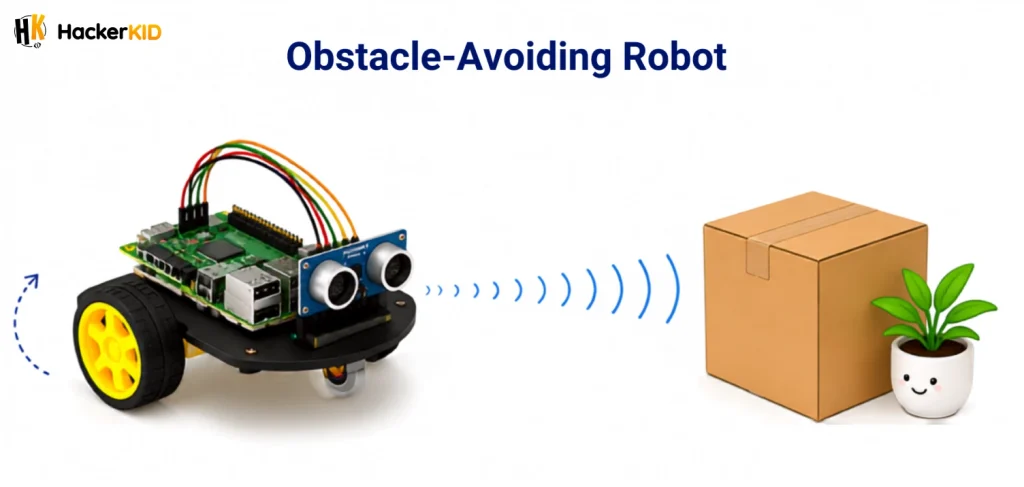
How it works:
- Step 1: Connect an ultrasonic sensor to the Raspberry Pi board.
- Step 2: The sensor sends out sound waves to detect objects in front of the robot.
- Step 3: The sensor sends the distance information to the Raspberry Pi board.
- Step 4: Raspberry Pi processes the information using the programmed instructions.
- Step 5: If an obstacle is detected, Raspberry Pi sends instructions to the motors.
- Step 6: The motors change the robot’s direction so it can move around the obstacle.
This project helps children understand how sensors, programming, and motors work together to make a robot respond to its surroundings.
Example Raspberry Pi Robotics Project 2: Weather Monitoring Robot
A weather monitoring robot can collect information about its surroundings, such as temperature and humidity, using connected sensors.
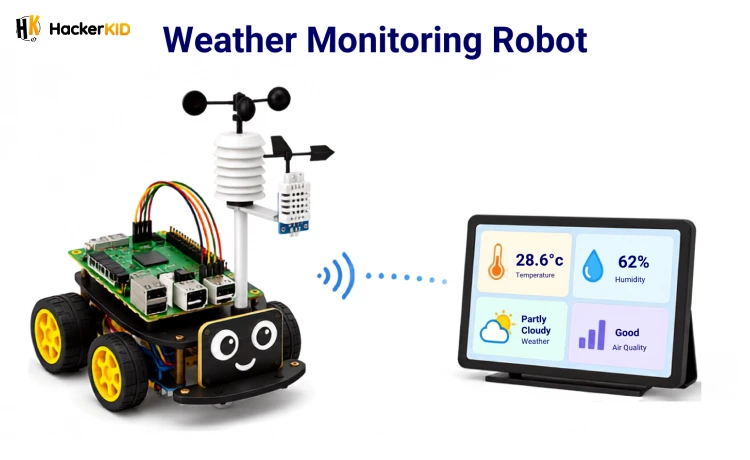
How it works:
- Step 1: Connect temperature and humidity sensors to the Raspberry Pi board.
- Step 2: The sensors measure the conditions around the robot.
- Step 3: The sensors send the collected information to the Raspberry Pi board.
- Step 4: Raspberry Pi processes and stores the sensor data.
- Step 5: The collected information can be displayed on a connected screen or sent to another device.
- Step 6: The robot can continue collecting data at regular intervals to monitor changes in the weather.
This project introduces children to sensors, data collection, and automation while showing how Raspberry Pi can be used to build useful real-world projects.
What Programming Language Can Kids Learn with Raspberry Pi?
Python is the main programming language used on Raspberry Pi. It can be used to control hardware like sensors, motors, and LEDs in robotics projects.
With Python, kids can write simple programs to make robots move and respond to inputs, building a foundation for more advanced robotics.
A Simple Python Example
Here is a basic example of Python programming with Raspberry Pi that turns an LED on:
from gpiozero import LED

led = LED(17)

led.on()
In this example, the program tells the Raspberry Pi board to turn on the LED connected to GPIO pin 17. By changing the code, kids can make the LED turn off, blink, or respond to input from a sensor.
Starting with simple programs like this helps kids understand the connection between code and hardware.
Raspberry Pi vs Arduino: Which One Should Kids Choose?
Both Arduino and Raspberry Pi are useful for learning robotics, but they are suited to different types of robotics projects. Arduino is a good starting point for learning basic electronics and controlling simple components, while Raspberry Pi is better suited to projects that involve more complex tasks and features.
Arduino
Arduino is a microcontroller board designed mainly to control electronic components. It can read information from sensors and send instructions to components such as motors, LEDs, and buzzers.
It is a good choice for projects that involve:
- Basic sensor-based robots
- Motor control
- LEDs and buzzers
- Simple automation projects
- Learning basic electronics
Raspberry Pi
Raspberry Pi can handle complex tasks in robotics. It can connect to the internet, process images, work with cameras, and control different components such as sensors, motors, and LEDs. It is a good choice for projects that require more processing and advanced features.
It is well suited for projects that involve:
- Cameras and image detection
- Internet and IoT projects
- Data processing
- Advanced robotics applications
- Python programming
Both platforms can be useful for learning robotics. The right choice depends on the type of project and the skills being learned.
Conclusion
Raspberry Pi for kids offers an exciting way to learn coding, electronics, and robotics through hands-on projects. By building Raspberry Pi projects and exploring coding and robotics for kids, children can gain practical experience that supports their future learning in robotics.
Ready to explore robotics beyond Raspberry Pi? Join HackerKID’s Advanced AI Robotics Course for Kids and start building exciting robotics projects.
FAQs
💬 Quick Answers 1. What is Raspberry Pi used for?
Raspberry Pi can be used to learn robotics and electronics through hands-on projects. It can connect with sensors, motors, cameras, and other components to create interactive projects.
2. Is Raspberry Pi easy for beginners?
Yes, Raspberry Pi can be a good starting point for kids because it supports beginner-friendly programming and hands-on projects. Python is also widely used with Raspberry Pi and is easy to read and learn.
3. Can you build a robot with Raspberry Pi?
Yes, you can build robots with Raspberry Pi by connecting it to sensors, motors, and other components. With code, the board can process information and control how the robot responds.
4. What programming language is used for Raspberry Pi?
Python is one of the most popular programming languages used with Raspberry Pi. It can be used to build robots and control electronic components.
5. What is the difference between Raspberry Pi and Arduino?
Raspberry Pi is suited to projects that need more processing and features, while Arduino is mainly designed for controlling electronic components. Both can be used for robotics, but they are suited to different types of projects.
Table of Contents
What Is Raspberry Pi?
Why Is Raspberry Pi for Kids Ideal for Learning Robotics?
Components of Raspberry Pi
How Is Raspberry Pi Used in Robotics?
Robotics Projects Kids Can Build with Raspberry Pi
What Programming Language Can Kids Learn with Raspberry Pi?
Raspberry Pi vs Arduino: Which One Should Kids Choose?
Conclusion
FAQs


Related Posts
10 Easy Robotics Projects for Kids to Try (Beginner Level)
You might feel building a robot is hard, but it is easier than you think. With just a few basic …
August 26, 2026 | 8 mins read
Read More
What Are Robot Sensors and How Do Robots Use Sensors to Interact With the World?
Close your eyes for a second. Now try to walk across your room. Hard, right? You might bump into a chair …
August 26, 2026 | 7 mins read
Read More
Why Learning Robotics for Kids Today Opens Big Opportunities Tomorrow
Imagine a world where your child doesn't just use technology but creates it. From smart devices to robots that solve …
August 26, 2026 | 7 mins read
Read More