



Successfully Submitted
What Is UI and UX Design and Why Do Apps Need Both?
By Vaishnavi E
July 6, 2026 (Last Updated) | 6 mins read
Have you ever opened an app and thought, “Wow, this looks so cool!” or “This is so easy to use!” but never really wondered why? If you have, you’re already thinking about what is UI and UX design without even knowing it!
Well, there’s a reason some apps feel amazing and others feel confusing and frustrating. And that reason comes down to two things: UI Design and UX Design.
Let’s break it down in the simplest way possible.
First, Let’s Talk About an App You Already Know
Think about YouTube.
When you open YouTube, you see:
- A clean home screen with video thumbnails
- A search bar right at the top
- Big, easy-to-tap buttons
- A dark mode that’s easy on your eyes
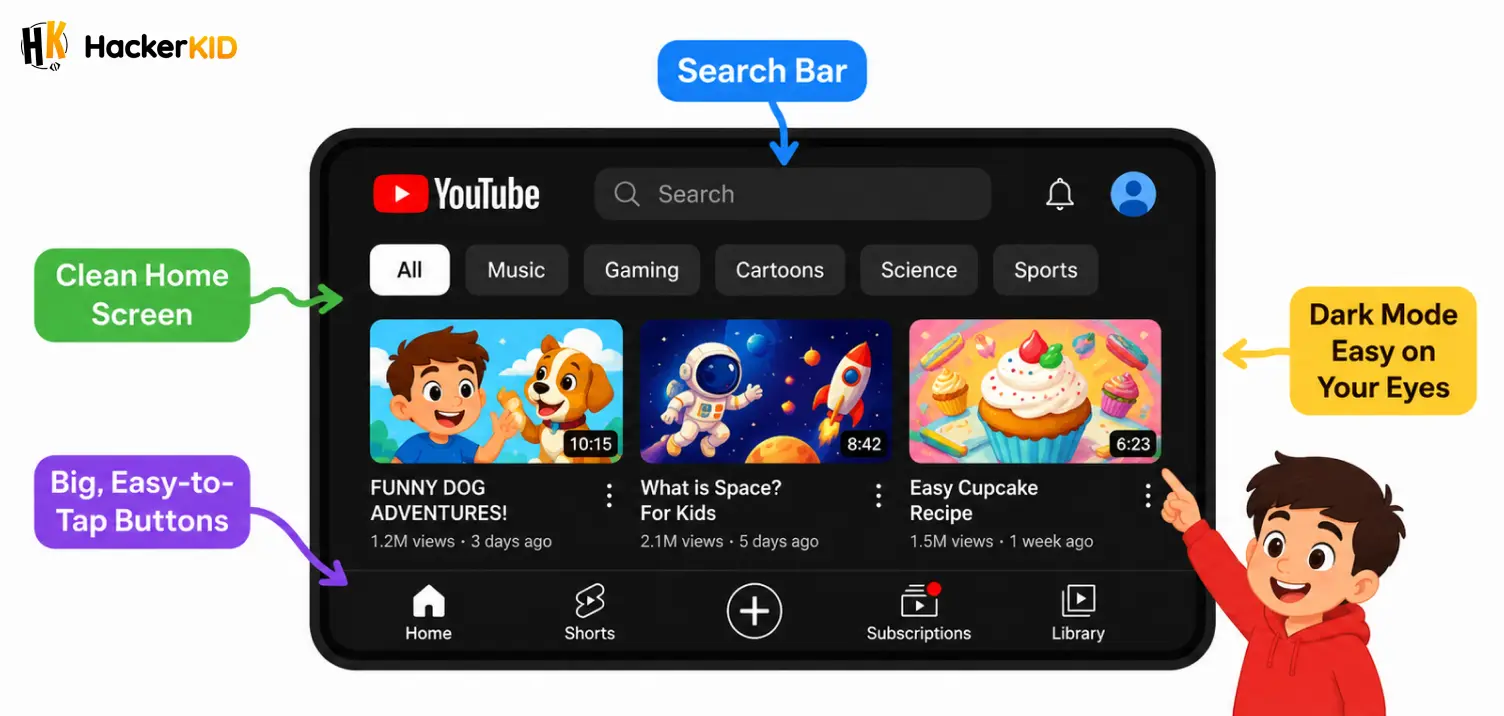
Everything looks neat and feels smooth, right? You can find your favourite video in just a few seconds without getting confused.
That didn’t happen by accident. A whole team of designers worked hard to make it look good and feel easy. That’s where UI and UX come in. And understanding app design basics starts right here.
What Is UI? (User Interface Design)
UI stands for User Interface.
So, what is UI exactly? The “interface” is everything you can see on the screen: the buttons, colours, fonts, icons, images, and layouts. The UI design meaning is simply the job of making all of that look great.
Think of UI like the outfit of an app. It’s what catches your eye first. When you think about how does an app look, you’re thinking about UI.
Real-Life Example: Instagram
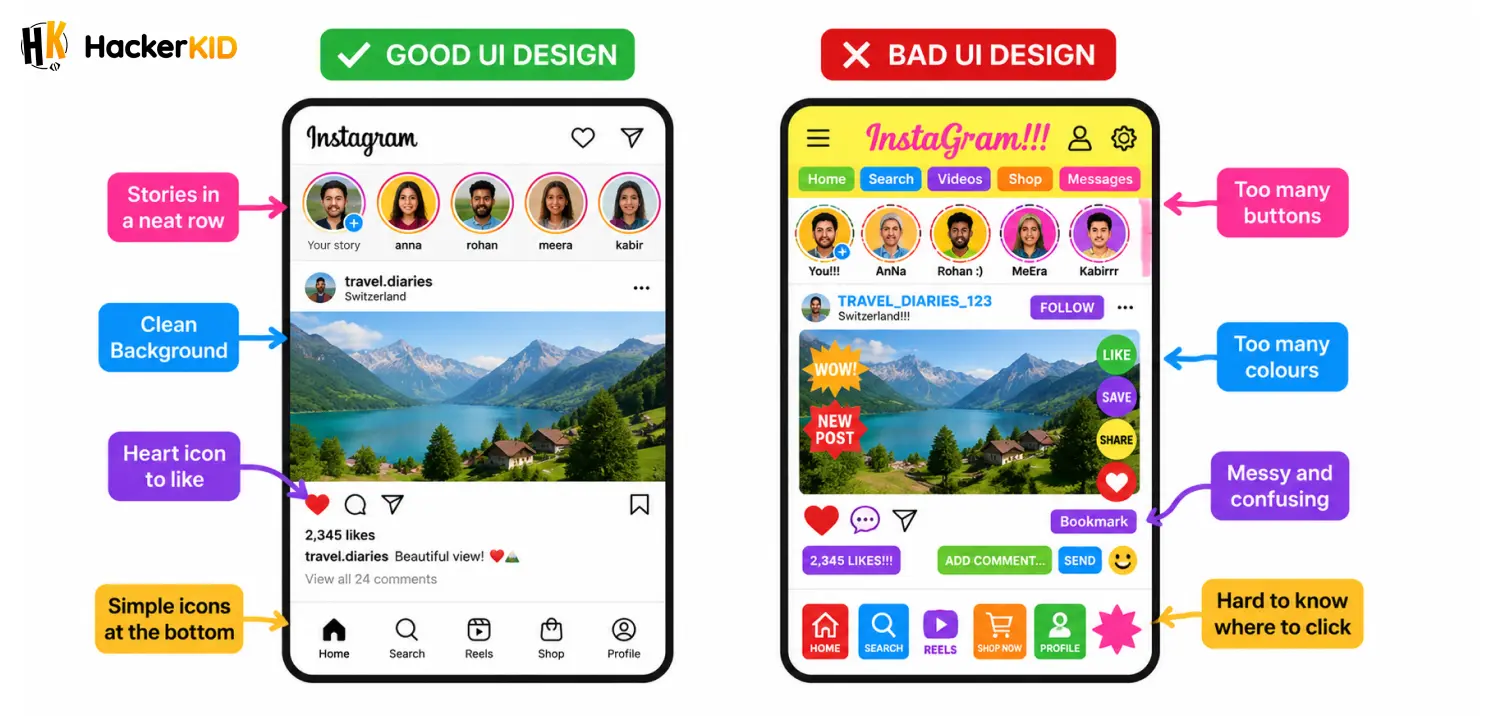
Open Instagram and look at it for a second. You’ll notice:
- A clean white or black background
- Simple icons at the bottom (home, search, reels, shop, profile)
- Stories shown in a neat row at the top
- A heart icon to like a post
All of these are user interface examples. A UI designer chose the colours, picked the fonts, and decided exactly where each button goes. Their goal is to make the app look attractive and easy to understand just by looking at it.
If Instagram suddenly had 20 random buttons all over the screen in different sizes and colours, it would look like a total mess and you’d probably delete it. That’s why good UI design matters so much.
Want to go beyond design and actually build an app? Join our App Development Course made for kids like you and start building your app!
What Is UX? (User Experience Design)
UX stands for User Experience.
So, what is UX exactly? The UX design meaning is all about how the app feels when you use it. Is it easy to find what you’re looking for? Does it take too many steps to do something simple? Does it make you feel happy or frustrated?
Think of UX like the layout of a building. Even if a building looks beautiful from the outside, if the rooms are confusing and there are no signs, you’ll get lost inside. UX makes sure the inside makes sense.
Real-Life Example: Roblox
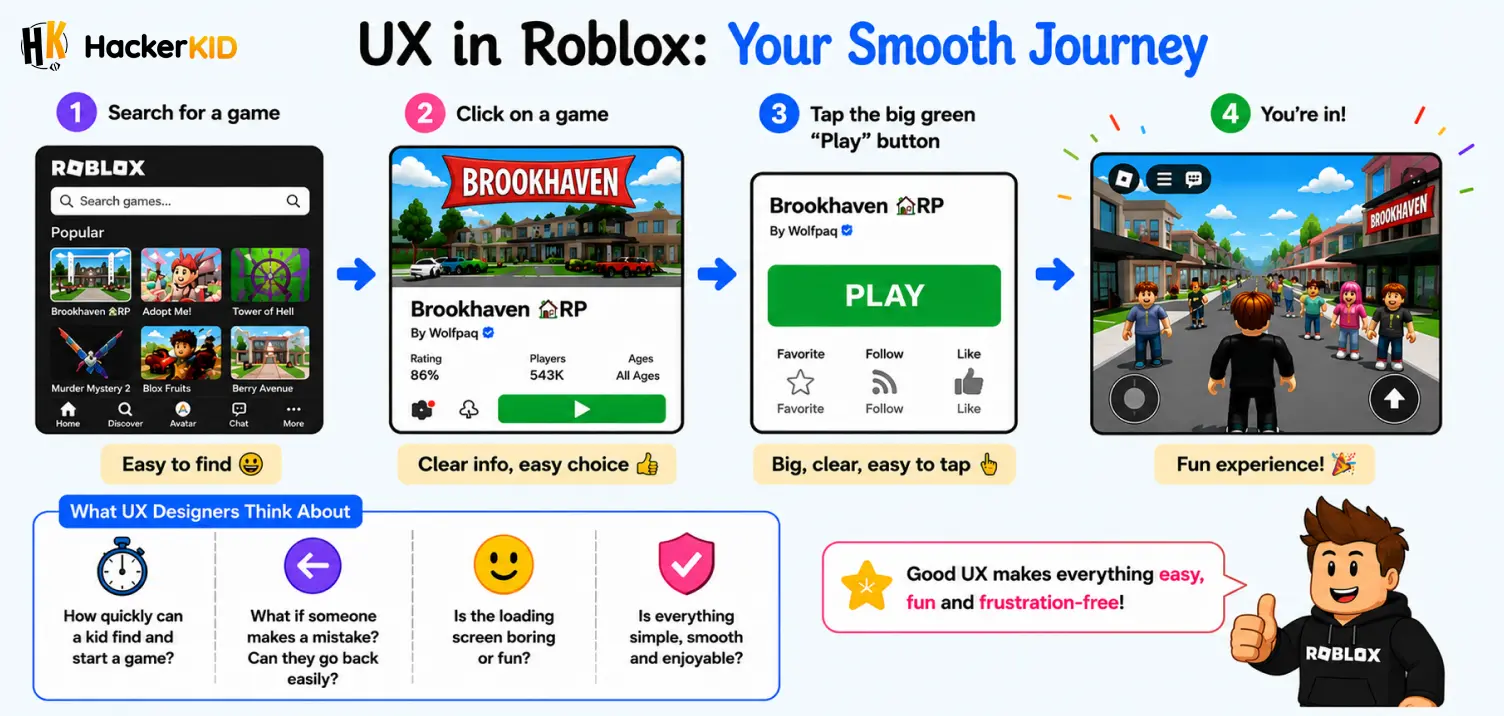
When you open Roblox and want to play a game, what do you do?
- You search for a game
- You click on it
- You hit the big green “Play” button
- You’re in!
That whole journey from opening the app to playing the game is your experience. A UX designer planned every step of that journey. They asked questions like:
- How quickly can a kid find and start a game?
- What if someone makes a mistake? Can they go back easily?
- Is the loading screen boring or fun?
If Roblox made you click through 10 confusing screens just to start a game, you’d close the app immediately. Good UX makes sure that never happens.
UI vs UX Design: What’s the Difference?
Now that you know both, let’s talk about the difference between UI and UX. A lot of people mix these two up, so let’s put it side by side to make it super clear:
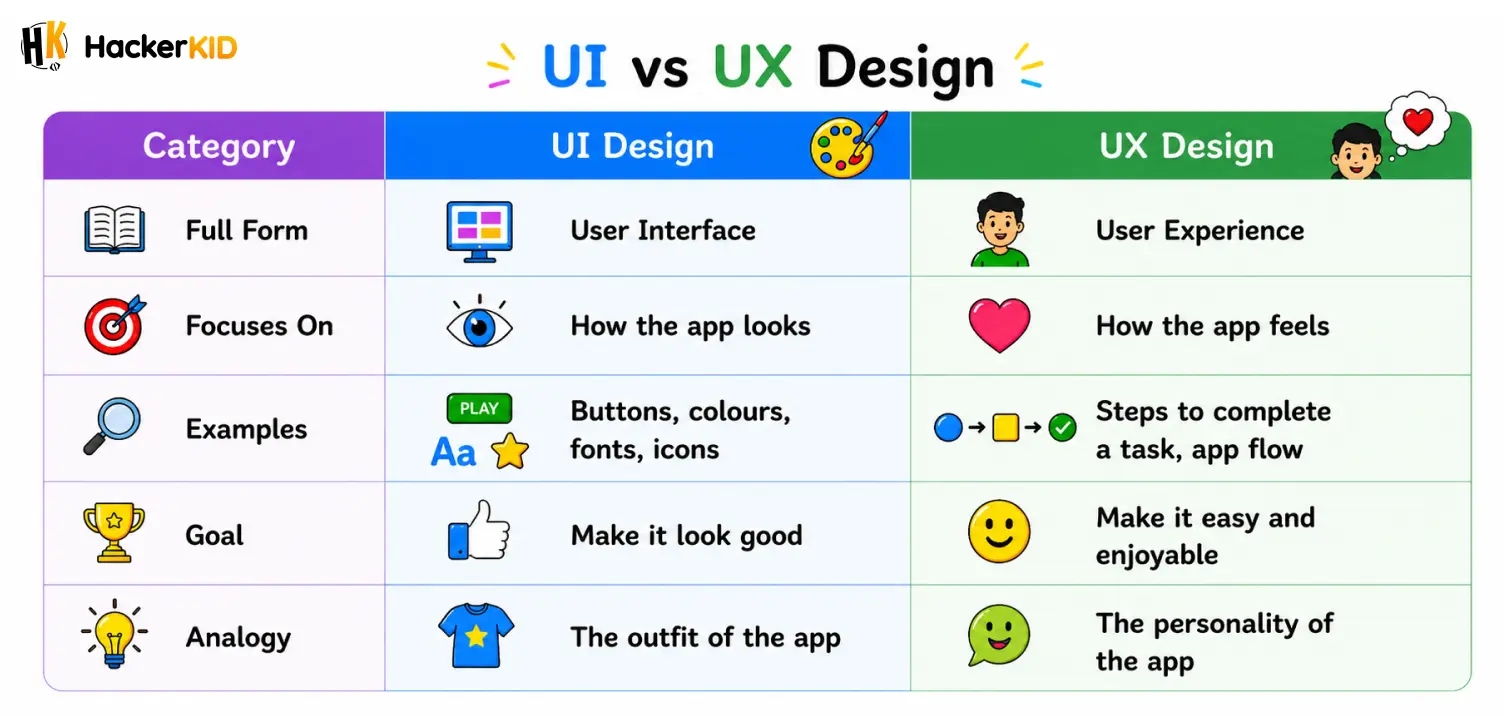
Here’s an easy way to remember the UI vs UX design difference:
UI = Looks. UX = Feels.
An app can look beautiful (great UI) but still be confusing to use (bad UX). And an app can be super easy to use (great UX) but look outdated and boring (bad UI). You need both to make an app that people love.
A Story to Make It Click
Imagine your friend builds a lemonade stand.
She paints it bright yellow, puts up a glittery sign, and decorates it with cute little lemons. It looks absolutely amazing. Everyone stops to look at it. That’s the UI: it caught your attention.
But then when you try to buy lemonade, there’s no price tag. You don’t know where to stand. The cups are hidden behind the stand. It takes five minutes just to get one glass. You walk away a little annoyed. That’s bad UX: the experience wasn’t smooth.
Now imagine the same stand with the same beautiful look, but this time the price is clearly written, there’s a line to stand in, and your lemonade is ready in 30 seconds. That’s great UI AND great UX working together.
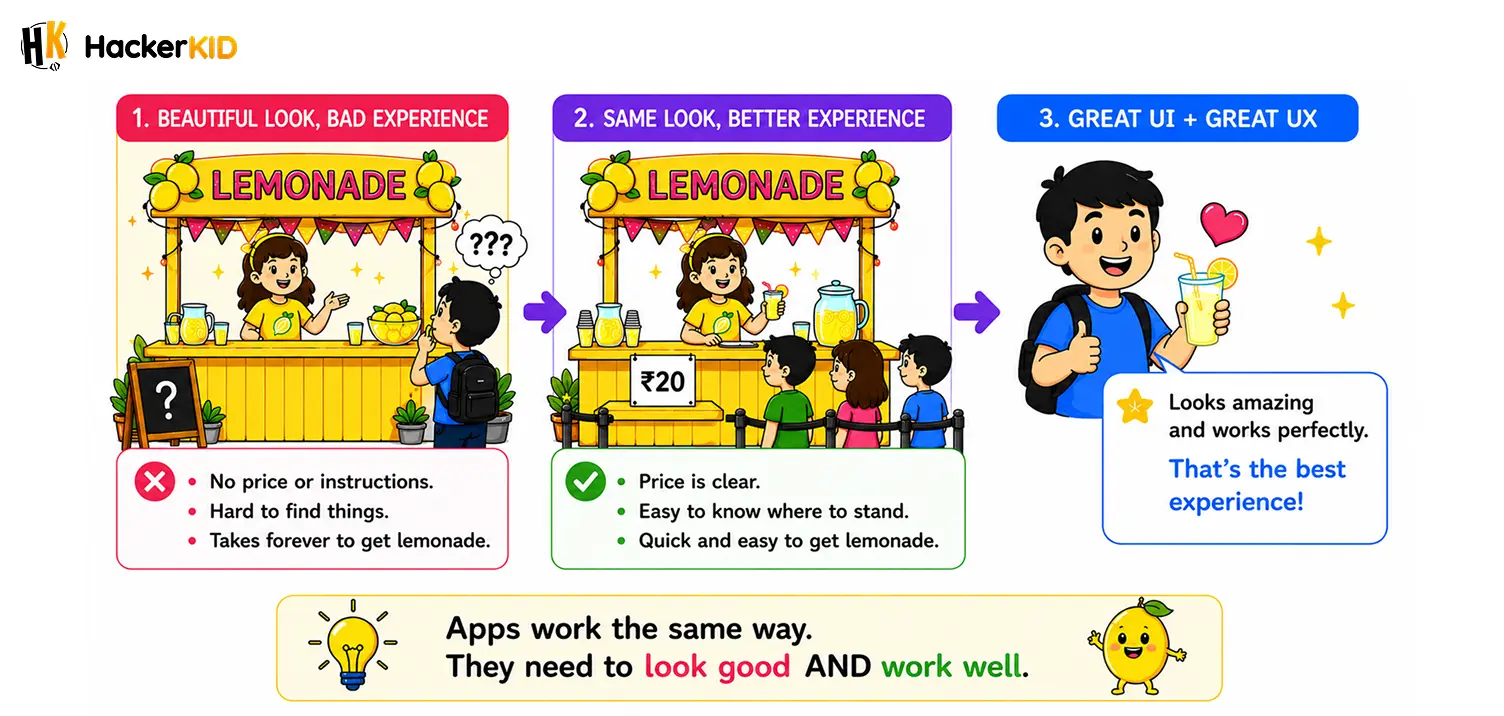
Apps work the same way. They need to look good and work well.
Why Do Apps Have Good Design? (UI and UX Together)
This is one of the most important questions in tech today: why do apps have good design? Here’s why having both UI and UX matters:
1. First Impressions Are Everything
When you open a new app, you decide within seconds whether you like it or not. A great UI makes sure that first impression is a good one. If it looks messy or old, you might close it before even trying it.
2. You Need to Actually Be Able to Use It
Looking good isn’t enough. If the app is confusing, you’ll give up and find another one. Good UX makes sure you can do what you came to do quickly and easily.
3. It Keeps You Coming Back
Apps like Spotify, Minecraft, and YouTube keep millions of people coming back every day. Part of the reason is that they both look great and feel smooth to use. That combo is hard to resist.
4. Happy Users = Successful App
If an app is frustrating, people leave bad reviews and delete it. But when an app feels good to use, people share it with their friends. UI and UX together create that happy user experience.
What Does a UI/UX Designer Actually Do?
If you think this sounds like a cool job, you’re right! Here’s a quick peek at what UI/UX designers do every day:
UX Designers:
- Research what users need and want
- Draw rough sketches called “wireframes” (like a blueprint for the app)
- Plan the steps a user takes inside the app
- Test the app with real users and fix problems
UI Designers:
- Choose colour palettes and fonts
- Design buttons, icons, and illustrations
- Make sure everything looks consistent and clean
- Create the final visual look of every screen
Some designers do both jobs and they’re called UI/UX Designers. It’s one of the most in-demand creative tech jobs in the world right now!
Try This Challenge!
Next time you open any app, whether it’s Minecraft, Snapchat, Google Maps, or even your school’s learning app, ask yourself:
- Does this look nice? (That’s UI)
- Is it easy to find what I need? (That’s UX)
- What would I change to make it better?
This is exactly how real designers think. You don’t need to be an adult to start thinking like a designer. In fact, many young coders and designers have already created apps that millions of people use!
Want to learn more about how apps are built? Check out our App Development Course for kids, start learning and creating!
Quick Recap
Here’s a summary of what is UI and UX design in simple points:
- UI (User Interface) = How the app looks: colours, buttons, fonts, icons. These are your user interface examples in action.
- UX (User Experience) = How the app feels: easy to use, logical, smooth.
- The difference between UI and UX is simple: UI is looks, UX is feels.
- In UI vs UX design, both are equally important and work best together.
- Real apps like YouTube, Instagram, and Roblox are perfect examples of good app design basics done right.
Now you truly understand what is UI and UX design and why every app you love needs both. Design is not just for artists. It’s for problem-solvers, creators, and curious minds just like you. Whether you want to build your own app someday or just understand the technology you use every day, knowing about UI and UX is a great place to start.
And who knows? The next big app that everyone loves might just be designed by you.
FAQs
💬 Quick Answers 1. What is UI and UX design in simple words?
UI design is about how an app looks and UX design is about how an app feels. Both work together to make apps easy and enjoyable to use.
UI (User Interface) = Colours, buttons, fonts, and icons
UX (User Experience) = Flow, ease of use, and smooth navigation
Together they make an app look good and work well
2. What is the difference between UI and UX?
UI Design = How the app looks, colours, buttons, and fonts. Ex: WhatsApp’s icons and layout
UX Design = How the app feels, steps, flow, and ease of use. Ex: Roblox’s easy game flow
3. What are some real-life examples of UI and UX design?
Here are some apps you already know and use every day:
YouTube
UI: Bright video pictures, clear buttons, and dark mode
UX: Finding and playing a video in just a few taps
Instagram
UI: Stories row, heart icon, and bottom navigation bar
UX: Scrolling, liking, and sharing posts without confusion
Google Maps
UI: Clear map view, simple search bar, and colour coded routes
UX: Getting directions from one place to another easily
4. Should I learn UI or UX first?
Start with UX first. Here is why:
UX teaches you how to think about the user
It helps you plan the app before designing it
Once you understand UX, learning UI becomes much easier
Many beginners explore both together and find their favourite over time
5. Is UI harder than UX?
Neither is harder. They are just different from each other.
UI feels hard if: You are not comfortable with colours and visual layouts
UX feels hard if: Research and problem-solving are new to you
Love drawing? UI might feel more natural to you
Love planning? UX might feel more natural to you
With practice, both become easy and fun to learn.
6. What is an example of a user interface?
Think about Instagram. Everything you see on the screen is a user interface example.
The search bar at the top
The heart icon to like a post
The bottom navigation bar with home, reels, and profile icons
The row of stories at the top of your feed
Your phone keyboard is also a user interface. Every key you tap was designed to make typing easy and quick.
7. How can kids start learning UI and UX design?
Starting is easier than you think. Here are simple steps to get going:
Observe apps you use daily and notice what feels easy or confusing
Sketch layouts of your favourite app on paper
Try free tools like Canva or Figma to create simple designs
Watch short tutorials on YouTube to learn the basics
Take beginner courses designed specially for kids to grow your skills faster
Table of Contents
First, Let's Talk About an App You Already Know
What Is UI? (User Interface Design)
What Is UX? (User Experience Design)
UI vs UX Design: What's the Difference?
A Story to Make It Click
Why Do Apps Have Good Design? (UI and UX Together)
What Does a UI/UX Designer Actually Do?
Try This Challenge!
Quick Recap
FAQs


Related Posts
Android vs iOS App Development: What Young App Developers Should Know
Have you ever noticed that some of your friends have an iPhone and others have an Android phone, but the …
July 6, 2026 | 7 mins read
Read More

What Is the Difference Between a Web App and a Mobile App?
Have you ever opened YouTube on your laptop browser and also on your phone? Did you notice they look a …
July 6, 2026 | 6 mins read
Read More

The Beginner's Guide to Understanding How Mobile Apps Are Made
Have you ever opened Instagram to check your friend's post, played a round of Subway Surfers while waiting for lunch, …
July 6, 2026 | 6 mins read
Read More